Find us on Google Plus

Showing posts with label App. Show all posts

Monday, 28 April 2014

InstaWeather Pro v3.6.0 Apk
InstaWeather Pro v3.6.0 Apk

Cover art
This is not another boring weather forecast app ;)!
NO ADS! NO InApps!
How does it work?
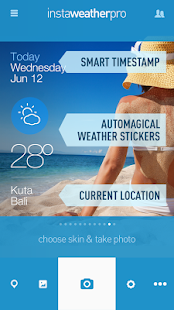
With InstaWeather you can share the weather report and forecast from the place where your are now – on top of your favourite photo or video that you have just snapped with your Android.
Create inspirational & informational images to share quickly and easily. In seconds you can check weather and talk weather.
InstaWeather knows when you are in certain moment and show it on overlay added to your photo & video! So if you are lost somewhere just make a photo using this app and find the way back home.
Editable text – add your own text or comment to photo customized by InstaWeather? No problem!
Share it everywhere in a flash: Facebook, Twitter, Instagram, Foursquare or send it via SMS or mail.
Make your friends jealous, place a perfect weather report on top of your photo!
Over 70 different skins. YES over 70 skins!!
You can easily choose your favourite skin from over 60 available with various weather data: from current temperature and simple info about the location to very detailed forecast with air pressure, temperature, rain, wind power and direction.

InstaWeather Pro - screenshot thumbnailInstaWeather Pro - screenshot thumbnailInstaWeather Pro - screenshot thumbnail
You can also choose the period of the displayed forecast: today, next few days or a whole week.
It works with Celsius & Fahrenheit, kilometres, miles.
Install and share the weather with friends! Let the weather be always good for you!
Why get PRO version?
Pro has more skins
Pro is updated first, 2 weeks earlier (or more)
Pro has watermark OFF switch
Pro has more options
Pro has no banner ads
Pro helps us deliver new versions of Instaweather :) and You are PRO

READ MORE AT GOOGLE PLAY STORE


OR


Upcoming searchesdownload InstaWeather Pro v3.6InstaWeather Pro v3.6.apkfull version InstaWeather Pro v3.6apk InstaWeather Pro v3.6download apk InstaWeather Pro v3.6.apk

Trivia Crack (Ad free) v1.6 Apk

Trivia Crack (Ad free) v1.6 Apk

Cover art
From the creators of Aworded arrives Trivia Crack, the amazing quiz game that lets you test your knowledge and challenge your friends to see who is the smartest!
Trivia Crack is a trivia game with six different categories: geography, history, art & literature, science and technology, entertainment, and sports. You’ll have to collect the characters that correspond to each one of the categories. Spin the wheel and chance will decide which category you will have to answer. If the wheel stops at the special slot, you’ll be able to play for a character of your choice!
But knowledge is not enough to win! Trivia Crack is also a game of strategy: you can steal characters from your opponents if you challenge them on a duel! If the wheel stops at the the special slot, you’ll be able to choose between playing for a character or challenging your opponent so you can steal one of his. Additionally, Trivia Crack includes four Power-Ups that will help you get the correct answer to the most difficult questions.
Trivia Crack has a bright, lively, sophisticated and intuitive interface, and you’ll enjoy incredible animations as you answer the questions!
Trivia Crack is a fast, dynamic and addictive game. There are more than 90.000 questions that will be constantly updated and you can suggest your own! It’s available in Spanish for Spain and Latin America, and in English for the United States and United Kingdom. New languages coming soon!
Highlights:
- Test your knowledge
- Combines wit and strategy
- Challenge your friends to a duel
- Chat with your opponents during games
- Share your achievements
What’s New
What’s new in version 1.6:
- Question Factory redesign
- Bug fixes

READ MORE AT GOOGLE PLAY STORE


OR


Upcoming searchesdownload Trivia Crack (Ad free) v1.6Trivia Crack (Ad free) v1.6.apkfull version Trivia Crack (Ad free) v1.6apk Trivia Crack (Ad free) v1.6download apk Trivia Crack (Ad free) v1.6.apk

Convertor Pro v6.1 Apk

Convertor Pro v6.1 Apk

Cover art
All the units you need to convert, wrapped in the best user interface: as easy and intuitive to use as a calculator. It’s unit conversion done right!
• Converts as you type (no “Convert” button to press)
• Use mixed units, like feet+inches
• Freely mix fractions (like ½) with decimals (like 0.5)
• Switch units by swipe, long-press, or menu
• Unit calculator with clipboard “memory”
• Supports tablets
• Three UI skin options: Holo Dark, Holo Light, and Classic Gray
• Includes Chinese and Hong Kong units
• Unit categories cover everything from the basics of length, weight and volume to more specialist measurements like magnetic flux density, torque, or radioactive decay.
What’s New
• Support single-tap to select category, or unit (on active unit row)
• Remove “Use fractions” checkbox from unit selection dialog
• Fix occasional crash when dis/enabling ads in settings (Free only)
• Fix bug: “Hide action bar” setting visible on some Samsung devices w/o a hardware Menu button
• Discontinue support for Android 1.6 (Donut)

READ MORE AT GOOGLE PLAY STORE


OR


Upcoming searchesdownload Convertor Pro v6.1Convertor Pro v6.1.apkfull version Convertor Pro v6.1apk Convertor Pro v6.1download apk Convertor Pro v6.1.apk

Calcoid™ Plus v1.5 Apk

Calcoid™ Plus v1.5 Apk

Cover art
Calcoid™ Plus
Get the best and visually stunning Android Scientific Calculator. This fully featured app is the enhanced and ad free version of “Android’s #1 Scientific Calculator.”
It is packed with many cool and useful features.
• Amazing backgrounds
• Trigonometric functions
• Degrees/radians
• Exponential
• Logarithm
• Percentages
• No advertising
• User-customizable sound ON/OFF

READ MORE AT GOOGLE PLAY STORE


OR


Upcoming searchesdownload Calcoid™ Plus v1.5Calcoid™ Plus v1.5.apkfull version Calcoid™ Plus v1.5apk Calcoid™ Plus v1.5download apk Calcoid™ Plus v1.5.apk

Sliding Messaging Pro v8.30 Apk

Sliding Messaging Pro v8.30 Apk

Sliding Messaging Pro - screenshot thumbnail
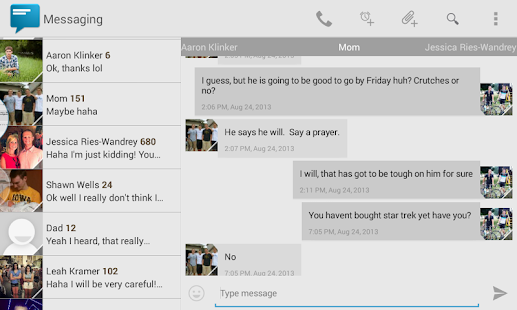
Easily manage text messages in a new and up to date format compliant with the Android design guidelines and visually based on the stock messaging app from Google, with added features.
Features:
- Easily switch between conversations by dragging out the sliding menu on the left side of the screen.
- Start a new conversation by sliding out the menu on the right side of the screen
- Manage old messages with a single click
- Choose between 10 different themes or make your own from scratch
- Emoji support (1300+ to choose from)
- Google Voice support
- Quick reply popup
- Quick message templates
- Multi-window support for Galaxy Note
- Light Flow support
- Support for sending and viewing picture and group messages
- Option to choose background images for conversations menu and message list
- Custom animations
- Widget
- Individual notification settings
- Contact blacklisting settings
- Security settings
- And so much more!
What’s New
- Updated UI for pull to oad more messages
- Faster and more accurate way to automatically find device APNs
- Added preset user agent options, use these if you are receiving pictures at a smaller resolution then they should be.

READ MORE AT GOOGLE PLAY STORE


OR


Upcoming searchesdownload Sliding Messaging Pro v8.30Sliding Messaging Pro v8.30.apkfull version Sliding Messaging Pro v8.30apk Sliding Messaging Pro v8.30download apk Sliding Messaging Pro v8.30.apk

Duo: Holo File Manager Pro v1.0.20 Apk

Duo: Holo File Manager Pro v1.0.20 Apk

Cover art
This is the paid version with no ads and no internet permission.
Duo: Holo File Manager Pro (DuoFM for short, formerly UNCOPT File Browser), aims to be your go-to app for everything file-related on your android device.
It is similar to Windows Explorer or Mac finder on your computer. Just like them, it can be used to access files on the device, and also to browse the files on your network or on cloud services.
DuoFM combines the features of the popular file managers (like Astro, ES Explorer, Solid Explorer, …) and root explorers.
Its two main focus points are design and stability.
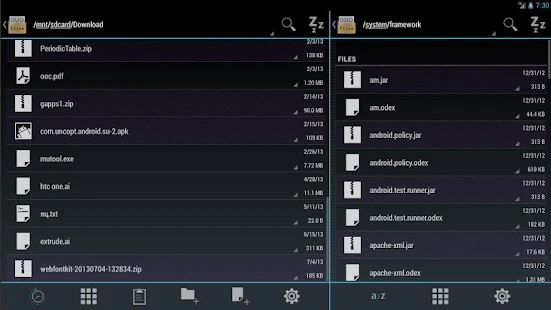
The application fits perfectly within the modern android holographic (Holo) style that was introduced with Android 4 (Ice Cream Sandwich or ICS). It looks and feels as if it was one of the apps bundled with the core of android, and follows Google design guidelines perfectly. At the same time, it improves on usability thanks to its innovative dual (split) navigation pane that is fully adjustable, and its navigation spinner in the action bar. DuoFM has also been optimized to adapt its layout on a tablet.
Extra attention is being placed on stability. This is about not crashing and having features that work the way you expect them to. This includes a lot of little things, such as restoring the state correctly when coming back from the background, or reacting to outside changes.
This mindset drove us to take unusual approaches to the way we implemented some of the core features. Those differences might not be noticeable at first, but they participate in making DuoFM rock solid and enable workflows that other applications don’t support.
Two of those decisions stand out.
The first is that we developped a native api (in c) to query the filesystem. This allowed us to use the same highly optimized api for accessing files on user accessible storage areas (such as the sdcard) or on root-only partitions. We extended that api to enable access to archive content as if they were simple directories on the filesystem, including nested archives.
The second is that we decided to never create any intermediate copies, not on the filesystem and not in memory. We support opening / sending / copying files of any size, without requiring any space left on the internal or external storage. This is true for all directories: local, remote (over the network or in the cloud), or inside archives. We stream the data to the target directory or application.
The various storage areas (internal memory, sdcards) are automatically detected, including On-The-Go (OTG) USB attachments when available. No user specification is required.
Duo: Holo File Manager Pro - screenshot thumbnail
Access to files not located on the device or its attachements is done through plugins. This separation is done to keep the main application small and to let users decide what extra feature to install. The available plugins are listed in the settings.
So far, the following plugins are available (and free):
- LAN: to give access to the local network shares (windows, SAMBA or SMB).
- Google Drive
- SkyDrive
- Dropbox

READ MORE AT GOOGLE PLAY STORE


OR


Upcoming searchesdownload Duo: Holo File Manager Pro v1.0.20Duo: Holo File Manager Pro v1.0.20.apkfull version Duo: Holo File Manager Pro v1.0.20apk Duo: Holo File Manager Pro v1.0.20download apk Duo: Holo File Manager Pro v1.0.20.apk


AMI Player Pro v1.0 Apk

AMI Player Pro v1.0 Apk

Cover art
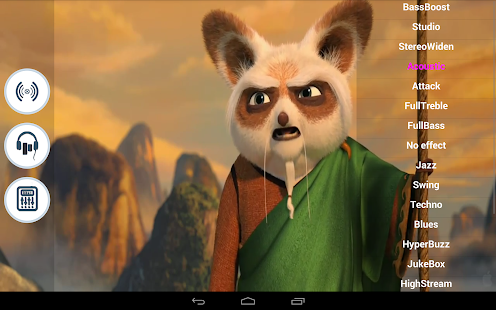
AMI Player Pro is an Advanced Media Impresa Player of Video and Audio. It is the first ever video player which gives different audio post processing effects for any video. Almost 19 audio effects, 9 voice effects and 13 convolution reverb effects are available. Same effects work with audio player as well. It gives excellent listening experience for videos and audios on Phones and Tablets. It comes with attractive and easy media player UI to apply different effects on any video/audio playback. It gives Volume Booster of 5dB extra on maximum allowed volume of the device.
Sure It is the best Video player and Audio player in recent times which comes with different equalizer, audio post processing, modulation and convolution reverberation effects.
Supported Video player Formats: mp4, 3gp, flv etc
Supported Audio player Formats: mp3, aac, wav etc
Supported Android Version: 4.1.0 and, above like Jelly Bean, KitKat etc.
Key features:
• Automatic identification of all the video/audio files in the device, show in thumbnail display
• Play, Pause, Next, Previous operation
• Unlimited number of Playlist creation: mixed with audio and video files
AMI Player Pro - screenshot thumbnail
• Repeat, Shuffle, Repeat one modes in any playlist
• HD Play back of video/audio files
• Volume Booster of about 5dB more
• Audio Post Processing effects like Bass Boost, Studio, Attack, Stereo Widening, Full Bass, Full Treble, Head Phone, Metal etc on Video Player as well Audio Player
• Voice effects like Echo, Feedback etc on Video Player as well Audio Player
• Fun effects like Voice Changer, Whistles etc on Video Player as well Audio Player
• Convolution reverberation effects like LargeHall, ConcertHall, MusicRoom on Video Player as well Audio Player
• Battery status, Date and Time display
• Hardware Acceleration for Video and Audio decoding
• Drains less battery than software based players
• Can play 1080P files if HW acceleration supported in the device
• Plays only audio in case video format is not supported
• Background playback support for Audio Player
• Background playback support for audio of video files in Video Player

READ MORE AT GOOGLE PLAY STORE


DOWNLOAD AMI Player Pro v1.0.apk
OR
PLAY STORE


Upcoming searchesdownload AMI Player Pro v1.0AMI Player Pro v1.0.apkfull version AMI Player Pro v1.0apk AMI Player Pro v1.0download apk AMI Player Pro v1.0.apk


XiiaLive™ Pro – Internet Radio v3.2.0.5 Apk

XiiaLive™ Pro – Internet Radio v3.2.0.5 Apk

XiiaLive
This is the PRO version of XiiaLive™, one of the top apps in the market, offering the most stable and uninterrupted Internet radio experience!
It lets you stream music and explore more than 50,000 live radio stations from all over the world.
By upgrading to XiiaLive PRO, besides from supporting our hard work, you also get some awesome added features and no banner ads!
FEATURES:
• All the features already included in our XiiaLive free version –variety of stations and directories, favorites, history, alarm, sleep timer, and sharing capabilities.
• No ads! You can stream without any adds appearing on your screen.
• Our REWIND option increases from 5 minutes on the free version to up to 60 minutes for the PRO version.
• We added more options for the NOTIFICATION SOUNDS. Now you can chose the sound you prefer.
• Advanced station filtering options.
• The ability to add homescreen SHORTCUTS to your favorite radio stations.
• Bluetooth advance controls with auto play/stop playback. Pick a device to automatically start playback upon pairing and also to stop playback upon disconnecting.
• Allows you to RESTORE a previous backup containing all your favorite songs and stations.
• Advanced streaming settings enabled –buffering length, unlimited retries, connect and read timeouts, among others.
• Extensive set of options that allow you to customize how Xiialive behaves on your device.
What’s New
The new jump from version 3.1.x to 3.2.x brings the most advanced streaming engine yet! It is faster, smarter, and more efficient than ever! It has been completely rewritten with efficiency and intelligence in mind.
Changes
- Fixed player page support for prev/next buttons
- Fixed http auth credentials getting erased
- Fixed new connection broadcasting stale metadata

READ MORE AT GOOGLE PLAY STORE


OR


Upcoming searchesdownload XiiaLive™ Pro – Internet Radio v3.2XiiaLive™ Pro – Internet Radio v3.2.apkfull version XiiaLive™ Pro – Internet Radio v3.2apk XiiaLive™ Pro – Internet Radio v3.2download apk XiiaLive™ Pro – Internet Radio v3.2.apk

Simply HDR v3.55 Apk

Simply HDR v3.55 Apk

Simply HDR - screenshot thumbnail

Simply HDR is an incredibly powerful HDR tool that instantly creates stunning imagery from otherwise bland subjects and compositions.
Have you ever looked at a well-executed HDR photo with a dramatic sky and wish you could take a shot like that? Now you can! With Simply HDR you can produce an outstanding picture with a maximized range of dynamic light and detail. Gone are the days of combining multiple images, we do it for you! With Simply HDR you can create your own stunning imagery using a single picture from your photo library, the end result will be an outstanding picture that’s captivating, mesmerizing, revealing and beautifully detailed. It is also user-friendly for both professional and amateur photographers.
HDR STYLES
• High Dynamic Range (HDR)
• HDArt
• Black and White HDR
• Contrasted HDR
• Shadows and Lights
• Contrasted Light
FEATURES
Fully adjustable control on all aspects of the process: HDR Strength, Tint Color Filters, Gradient Filters, Vignette, and Grain.

READ MORE AT GOOGLE PLAY STORE


OR


Upcoming searchesdownload Simply HDR v3.5Simply HDR v3.5.apkfull version Simply HDR v3.5apk Simply HDR v3.5download apk Simply HDR v3.5.apk

OfficeSuite QuickWrite Full v3.0.57 Apk

OfficeSuite QuickWrite Full v3.0.57 Apk

Cover art
QuickWrite is a multilingual keyboard app with intelligent contextual word prediction. Easy to set-up and time-saving QuickWrite, along with OfficeSuite, conveniently integrates with any application on your device and makes typing quick and fun. From text messaging, email and Facebook to professional text editing in mobile office applications QuickWrite will initiate as you start typing, will provide keyboard language and layout of your choice and will predict your next word before you even pressed a key.
QuickWrite improves as you type by learning from your way of writing and typical patterns. The more you use the app, the better the word prediction will get. Gesture or swipe writing improves your typing speed even more.
QuickWrite seamlessly integrates with OfficeSuite Pro and is specially optimized to document editing in OfficeSuite.
~~~Features:~~~
* Multilingual support and mufti-layout keyboards for some languages.
* Contextual word prediction for 21 languages.
* The most probable word is put in bold in center position for easy selection.
* Word suggestions are dynamically changed and improved on each next letter that you type
* Intelligent self-learning text prediction. QuickWrite learns from your way of writing, most frequent words and word patterns.
* Contacts on your device are imported and used for the text prediction.
* Ability to add words to the current language database.
* User dictionary for new words that you add.
* Writing with gestures – also known as swipe writing
* Statistics about your typing and the performance of QuickWrite.
* Resizable keyboard height
* Customizable word adding behavior in QuickWrite.
* Ability to choose where to store spelling dictionaries – on the device memory or memory.
~~~Language Support:~~~
QuickWrite provides over 50 multilingual keyboards and layouts as follows: You can install as many layouts as you wish.
* Afrikaans/qwerty
* Albanian
* Arabic/arabic
* Belarusian/east_slavic
* Bosnian
* Bulgarian/bulgarian
* Bulgarian/bulgarian_bds
* Catalan/spanish
* Czech/qwertz
* Danish/nordic
* German/qwertz
* Greek/greek
* English United States/qwerty
* English Great Britain/qwerty
* Esperanto/spanish
* Spanish/spanish
* Spanish United States/spanish
* Estonian/nordic
* Persian/arabic
* Finnish/nordic
* French/azerty
* French Canada/qwerty
* Hindi/hindi
* Croatian/qwertz
* Hungarian/qwertz
* Indonesian/qwerty
* Icelandic/qwerty
* Italian/qwerty
* Hebrew/hebrew
* Georgian/georgian
* Kyrgyz/east_slavic
* Lithuanian/qwerty
* Latvian/qwerty
* Macedonian/south_slavic
* Malay/qwerty
* Norwegian Bokmål/nordic
* Dutch/qwerty
* Dutch Belgium/azerty
* Polish/qwerty
* Portuguese Brazil/qwerty
* Portuguese Portugal/qwerty
* Romanian/qwerty
* Russian/east_slavic
* Slovak/qwerty
* Slovenian/qwerty
* Serbian/south_slavic
* Swedish/nordic
* Swahili/qwerty
* Thai/thai
* Tagalog/spanish
* Turkish/qwerty
* Ukrainian/east_slavic
* Vietnamese/qwerty
* Zulu/qwerty
* No-language/qwerty
For 21 most used languages of today QuickWrite offers contextual text prediction:
* Arabic
* Albanian
* Bosnian
* English US
* English UK
* Estonian
* German
* Farsi/ Persian
* French
* Hebrew
* Hungarian
* Icelandic
* Spanish
* Italian

READ MORE AT GOOGLE PLAY STORE


OR


Upcoming searchesdownload OfficeSuite QuickWrite Full v3.0OfficeSuite QuickWrite Full v3.0.apkfull version OfficeSuite QuickWrite Full v3.0apk OfficeSuite QuickWrite Full v3.0download apk OfficeSuite QuickWrite Full v3.0.apk

Win RAR for Android v5.10.build15 Apk

WinRAR for Android v5.10.build15 Apk

Cover art
RARLAB’s RAR for Android is an all-in-one, original, free, simple, easy and quick compression program, archiver, assistant, extractor, manager and even a basic file explorer.
RAR for Android can create RAR and ZIP and unpack RAR, ZIP, TAR, GZ, BZ2, XZ, 7z, ISO, ARJ archives. List of functions include repair command for damaged ZIP and RAR files, benchmark function compatible with RARLAB’s WinRAR benchmark, recovery record, usual and recovery volumes, encryption, solid archives, utilizing multiple CPU cores to compress data.
Additionally to standard ZIP files, unzip function supports ZIP and ZIPX with BZIP2, LZMA and PPMd compression also as password protected ZIP. Unrar command is available for all versions of RAR archives including the latest RAR5, password protected and multipart files.
What’s New
- “Information” command in “Options” menu. Outside of archive calculates the total size and various checksums for selected files and folders. Inside of archive displays detailed archive information including archive comment if present;
- “Hidden files” option in “Settings” controls display of file and folder names starting with dot;
- drag the fast scroll thumb to quickly scroll through long file list. “Scroll to top/bottom” items in navigation panel are removed.

READ MORE AT GOOGLE PLAY STORE


DOWNLOAD WinRAR for Android.apk
OR
PLAY STORE


Upcoming searchesdownload WinRAR for AndroidWinRAR for Android.apkfull version WinRAR for Androidapk WinRAR for Androiddownload apk WinRAR for Android.apk

Lightning Browser + v3.1.0a Apk

Lightning Browser + v3.1.0a Apk

Cover art
● The Lightning Browser + ●
● The Most Powerful Web Browser of Its Size ●
Features the free version doesn’t have
● Unlimited Tabs
● No Ads
Features:
● Holo Interface
● Incognito Mode
● Supports Froyo to JellyBean
● Tabbed Internet Browsing
● Supports Adobe Flash Player (download here: http://forum.xda-developers.com/showthread.php?t=2139513)
● Fast Start Times
● Small Footprint
● Fast Browsing
● Bookmarks
● Smooth Scrolling
● Google, DuckDuckGo, StartPage, Yahoo, Bing, and other search engines
Enjoy Lightning Browser, one of the smallest browsers around. It is a high-performance small-sized browser built for those who don’t want the cumbersome slowness or size of Firefox or Chrome. Email me with questions.
Navigation:
● Long-press the back button to exit the browser
● Long-press a link to open it in a new tab
● Long-press new tab button to open the last close tab
● Check out settings for more options
What’s New
3.1.0a
Added
- Google Search Suggestions (optional)
- Ad Blocker (optional)
- Auto-sort bookmarks alphabetically
Fixed

READ MORE AT GOOGLE PLAY STORE


OR


Upcoming searchesdownload Lightning BrowserLightning Browser.apkfull version Lightning Browserapk Lightning Browserdownload apk Lightning Browser.apk

Link2SD Plus v3.4.4 Apk

Link2SD Plus v3.4.4 Apk

Cover art
Link2SD is an application manager that makes it easy for Android 2.0+ users to move applications to the SD card, to clean all cache files of the apps. It enables you to manage your apps and storage easily.
It also provides native app to SD (app2sd) features on Android 2.2 and higher. It can move any non-protected user apps to SD card (force move), with batch moving capability.
That feature uses Android’s standard SD-card installation feature and does not require a second partition.
Cache cleaner function clears all your cache and free up space with a single tap. Also cache cleaner widget displays total cache size and enables “one tap cache cleaning” without opening the app.
Features:
- App manager
- Create and remove link for apk, dex and lib files of the app.
- Plus version also links private data files of the apps
- Automatically link newly installed apps (optional)
- Move any user apps to SD even though the app does not support moving to SD (a.k.a. “force move”, for Android 2.2 and higher)
- Shows the apps that support moving to SD with native apps2sd
- Set the default install location of the apps; auto, internal, or external
- Batch link, unlink, reinstall, uninstall, “move to SD”, “move to phone” functions
- Notify when movable apps installed
- Uninstall system applications (bloatware removal)
- Freeze and un-freeze system and users applications
- Convert system apps into user apps
- Convert user apps into system apps
- Integrate “Updated” system apps into system (ROM)
- Clear data and cache of the application
- Clear all apps cache at once (1-tap cache cleaner without being root)
- Exclusion list for “Clear all app cache” function
- Clear cache widget (1-tap cache cleaner without being root)
- Notify if total cache size exceeds specified size
- List applications, show detailed size information and link status
- Wide variety of options to sort and filter apps
- Search applications by name
- Display available space information of internal storage, SD card and SD card 2nd partition
- Share the link of an app
- Support 35+ languages
Plus features:
- Links internal data directories of the apps to SD card
- Links dex files of the system apps to SD card
- Auto clear cache service
- Removes ads from Link2SD
What you need for linking apps:
- root permission.
- a second partition on your SD card.

READ MORE AT GOOGLE PLAY STORE


OR


Upcoming searchesdownload Link2SD Plus v3.4Link2SD Plus v3.4.apkfull version Link2SD Plus v3.4apk Link2SD Plus v3.4download apk Link2SD Plus v3.4.apk

Dynamic Keyboard – Pro v1.10.2 Apk

Dynamic Keyboard – Pro v1.10.2 Apk

Cover art
Dynamic Keyboard! A keyboard that changes as you type!
Smart, Fast and Accurate!
Using machine learning technologies and artificial intelligence algorithms I have been able to create a database of intelligence that helps modify the keys visibility and size depending upon the likelihood of that letter. Trained with millions of words on 31 languages, why not try it out?
Features:
~~~~~~~~~
# Predictive Characters to aid your accuracy and speed change size
# Smooth Animations
# Full Customization (Pro Only)
# Colors or presets to choose from (Pro Only)
# Many Shortcuts (eg swipe left = delete last word, double tap space or shift)
# Tablet Optimized
# Tablet Split Mode (Pro Only)
# Battery Optimized
# Multiple languages at same time. (Pro Only)
# Safe
# Easy To Setup
# Google Voice Integrated! (Selected 4.0+ only)
# Auto-correct (4.0+ only)
# HD Fonts

READ MORE AT GOOGLE PLAY STORE


DOWNLOAD Dynamic Keyboard - Pro.apk
OR
PLAY STORE


Upcoming searchesdownload Dynamic Keyboard - ProDynamic Keyboard - Pro.apkfull version Dynamic Keyboard - Proapk Dynamic Keyboard - Prodownload apk Dynamic Keyboard - Pro.apk